Meatmeet Pro FAQS
What comes in the Meatmeet Pro box?
The Meatmeet Pro comes with the following: wireless probe, booster, and TypeC charging cable. A charging adaptor is not included.
Are batteries required?
The probe and the booster contain permanent, internal, rechargeable lithium batteries. Additional removable batteries are not required.
What does the Booster do?
The booster charges the probe and relays data from the probe to your smart device or tablet.
What is the probe's maximum temperature?
The max temperature for the portion of the probe inserted into the food is 212˚F. The max temperature for the ambient temperature sensor (located at the other end of the probe) is 1112˚F.
How do I turn my thermometer on and off?
There is no “off” switch on the probe. When not in its nest in the booster, the probe is always broadcasting data and so uses its battery even when not in the service of cooking. The booster has a power button. To turn the booster off, press and hold the power button for 2 seconds. In addition, the booster will automatically shut down 30 minutes after cooking is completed or if no operation is performed through the APP within 30 minutes.
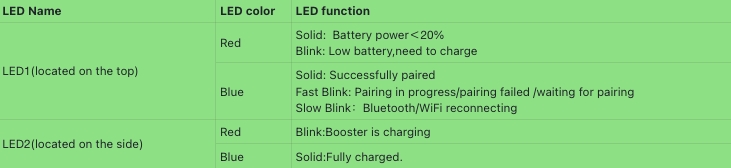
What do the colors for the lights mean?
There are two LEDs on the booster. One is located on the top, another is on the side.There functions are listed as below.
Do I need a smartphone or tablet to use my Meatmeet Pro?
Yes! You must pair your Meatmeet Pro (booster and probe) to a smart device in order to see any data via the free Meatmeet App, which you must also download. It works with iPhone and iPad iOS 13.0 or later, and Android phone and tablet 8.0 and up.
Must I download and use the Meatmeet app for Meatmeet Pro to work?
Yes. But it is free. Look for it in the App Store or on Google Play.
Do I need to be on WiFi?
You can use the Meatmeet Pro with just a Bluetooth connection to get basic cooking experience. However, some IoT cloud features will not work without WIFI.
How do I initiate pairing?
When ready to pair your Meatmeet Pro with the app, be sure the booster is switched on, then follow the directions on the app.
How do I charge my device?
To charge the booster, use the included TypeC cable to plug it into a USB charger. To charge the probe, securely position it in the nest in the booster.
How long does the charge last?
A full charge for the booster lasts for 20 hours, but the booster can always be plugged in to continue working. The probe holds a full charge for up to 36 hours.
How long does it take to charge the probe?
The probe requires about 45 minutes to fully charge and will sustain its charge for at least 36 hours of active use. (However, after just 10 minutes of charging, you can use the probe and it will work for more than 10 hours.)
How do I know if the probe is charging / charged?
Understanding whether your probe is charging or fully charged is straightforward. You can simply observe the battery icon to get the status on Meatmeet APP.
How long does it take to charge the booster?
The booster requires about 2 hours to fully charge and will sustain its charge for at least 20 hours of active use. When turned off, the booster will keep its charge for up to 1 year.
Does the booster hold its charge when not in use?
Yes. The booster holds its charge when not in use, but the probe is always using up its battery even when not being used to cook.
How do I know how much battery I have left?
One way to determine battery life is to go to the App where you can see how much charge remains on your probe and your booster. On the actual booster, its charge level is indicated by the light which is located on the top side. Red means less than 20% charged; blinking red means the battery is low and the booster should be charged.
Why isn't my booster charging?
You can tell the booster is charging when the side LED slowly blinks red. If it’s not charging, make sure the booster is plugged into the charger. If it is still not charging, please reach out to customer support for additional troubleshooting tips, or a replacement, if necessary.
Why isn't my probe charging in the booster?
Be sure the probe is clean as any residue on the probe can affect charging. Check that it’s snugly placed in the charging nest in the booster, and that the booster itself is charged or plugged into the charger.
Is the probe waterproof?
Yes, the probe is waterproof.
Is the probe dishwasher-safe?
Yes, the probe is technically top-rack dishwasher-safe. However, we don’t advise washing it in the dishwasher because it can get scratched. Plus, the probe is easy to simply wipe clean with soap and water.
How do I clean the probe?
Soap and hot water should be enough to clean the probe. Do not use scouring pads or harsh cleansers, which can also scratch the probe. For stuck-on foods, soak the probe in hot soapy water.
Can I use Meatmeet Pro for foods other than meat?
Yes! You can even use it to track the temperature of vegetables, too, as long they are large enough for the probe to be inserted and remain in place during cooking. Some of our favorites include potatoes and cauliflower.
Cooking with Meatmeet Pro
How do I use Meatmeet Pro?
First, choose the meat category and the doneness. Next, insert the probe and start cooking. While your food cooks, you can monitor its progress over Bluetooth or WiFi with the Meatmeet App. When the meat reaches to the target temperature and doneness,the APP will notify you via ringtone, vibration or pop-ups. Then remove your food from the heat and enjoy it!
Where do I insert the probe in my food?
The probe should be inserted into the thickest part of whatever you’re cooking and not touch bone.
Insert the probe deeply enough into the meat to make sure the safety notch on the probe is fully covered by the meat. This could avoid extremely high heat damaging electronics.
How do I set a custom temperature?
Simply go to the App to set whatever temperature you like.
My doneness is not what I expected.
If the doneness was not what you expected, check that the probe was properly inserted into the food.
Why are my Stick's temperatures off? How do I test accuracy?
Internal Temperature:
Different parts of a piece of meat will have different temperatures during cooking. It is not uncommon for the internal temperature of a large roast or turkey to vary by as much as 15 to 25 °F throughout the meat or bird. Even a steak or a boneless chicken breast can vary in temperature by several degrees depending on how the probe is inserted.
To get a correct reading, insert the probe into the thickest part of the meat from the side. Try to avoid obvious bones or cartilage.
Ambient Temperature:
Although the ambient temperature may seem off at first glance, it's actually working correctly because it measures the temperature directly around the meat, which tends to be lower than the other points of a cooking appliance. It also depends on the placement of the probe: directly above the meat, the temperature will be lower than on the side of the meat over the heat source. The probewill show the actual cooking temperature compared to the temperature reading of the appliance you are cooking on (once it reaches temperature).
Also, note that grills/ovens/smokers all have cold spots that can be as much as 50-75 degrees lower than what is being measured.
Where should I place the booster when cooking?
The Booster's open-air, unobstructed Bluetooth® connection has a wide range, but it works better the closer it is to the food you're cooking. This is especially true when the probe is covered by the grill. But don't put it too close. For example, never place it on a hot grill or pot lid because the plastic may melt.
Can I use the probe when grilling or smoking?
Yes!
Can I use the thermometer for deep frying as well as pan frying?
Yes! Just make sure the probe is inserted deeply and securely into the food, as with all cooking.
Can I use the probe in the microwave?
No. The stainless-steel components of the probe could cause sparking, and the probe may be damaged.
Can I use the thermometer for making candy?
Sorry, no.It would be damaged by the high heat.
Can I use the probe when pressure cooking?
No. The probe will be damaged by the pressure.
Can I wrap the probe in foil along with what I'm cooking?
While you can certainly wrap the food in foil, the end of the probe must be left exposed in order to maintain a connection.
How can I mute the booster?
If you would like to mute the buzzer notifications from the booster, you can do so on the app.
Why am I not receiving notifications?
If you are not receiving notifications, go to Meatmeet App and check that notifications are turned on.